


BURGER KING® App
4.4103.92K Reviews
App Specs
- Version
- 7.77.0
- Updated On
- License
- Free
- Downloads
- 10,000,000+
- Developer
- Burger King, Inc.
- Categories
- Food & Drink
- Platform
- Android, iOS
Screenshots
 Analysis by AppCompare
I judge the BURGER KING® App less by how many screens it has and more by whether it helps me make a quick, sensible choice when I’m hungry. If I already know I want Burger King, putting the menu, offers and ordering steps in one place can make a stop easier to plan. If I’m deciding between several kinds of food, though, a restaurant-specific app is naturally less useful than a general delivery or restaurant-discovery service.
Start with the choice you need to make
The key question is whether Burger King is already your likely destination. This is a free Food & Drink app from Burger King, Inc., aimed at people who want to browse that chain’s food, check available offers and arrange an order. It is not a broad restaurant guide, and I wouldn’t install it expecting to compare menus across town. Its value is greatest when you want a BK meal and would rather check the details before reaching the counter.
That distinction matters when you’re weighing convenience against flexibility. A restaurant’s own app can put its menu and promotions close at hand, while a general food-ordering service may be a better starting point if you have not settled on a restaurant. I’d use this one to decide what to get at Burger King, not to answer the wider question of where everyone in a group should eat.
There is a practical reason to open the app before setting off rather than while standing in line: you can look over the choices at your own pace and see whether an offer suits the meal you actually want. I find that more useful than chasing a deal simply because it appears on screen. An offer only feels like a saving if it fits your appetite and plans; otherwise it can nudge you toward spending on something you would not have chosen.
Menu and Customization
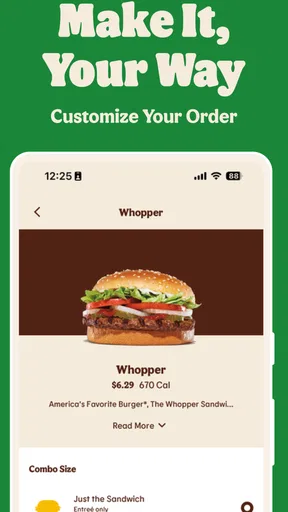
First off, the app offers the entire Burger King menu right at your fingertips. From the classic Whopper to those crispy chicken nuggets, everything is just a tap away. What’s even cooler is how you can customize your orders. Want extra cheese or minus the onions? No problem. The app makes it easy to tailor your meal exactly how you like it. Plus, the images of the food look so scrumptious, they might just make you hungrier!
Deals and Offers
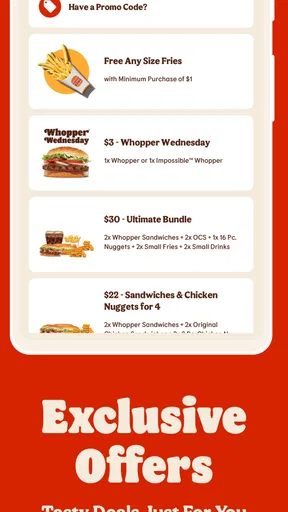
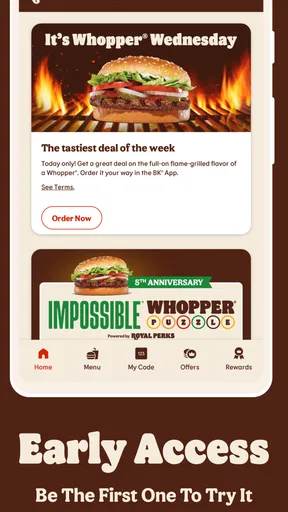
Now, let’s talk about one of my favorite parts—the deals! The BURGER KING® App is packed with exclusive offers that you won't find anywhere else. You could snag a free fries deal or a buy-one-get-one-free Whopper. It's like having a coupon book in your pocket. And who doesn't love saving a few bucks while munching on some flame-grilled goodness?
Use offers deliberately, not automatically
I’d treat the offers as a reason to check the app, not as a reason to change what I planned to eat. Before choosing one, compare it with the meal you would order without a promotion. That small pause helps keep a discount from turning into an unplanned extra. If you’re ordering for more than one person, it is also worth agreeing on the food first, then checking whether an offer fits the group, rather than building everyone’s order around a deal that only suits one person.
Worth Reading Before You Choose

Flipboard Shows What News Apps Must Do Beyond the Feed

Switching to Android Auto Means Rethinking Your Driving Routine

Google Calendar Makes a Crowded Week Easier to Manage

Ludo King Makes the Most of the Minutes Between Plans

Baby Panda World Brings Quick Play to Modern Phones, but Its Game Library Feels Busy

ESPN’s Live Game View Makes Following Close Games Easier
Promotions can also make the app more useful for someone who visits occasionally: a quick look before a planned stop may reveal an option worth considering. But I would not assume every offer will suit every visit. The practical approach is to read what is displayed in the app and decide whether its terms and the food match your situation. If none does, you can simply continue with the meal you wanted.
Ordering and Pickup
Ordering through the app is super straightforward. You can choose between home delivery or in-store pickup, depending on what suits you best. I tried the in-store pickup myself, and it was a breeze. Just place your order, stroll into your chosen location, and your meal is ready to go. Talk about convenience! No more waiting in long lines or dealing with hangry crowds.
Plan the handoff around your day
A realistic use case is a short lunch break when you already know which nearby Burger King you intend to visit. I’d check the menu and offers before leaving, settle the order while I still have a moment to think, and then follow the app’s pickup instructions. That workflow can reduce time spent deciding at the counter, but it is not a guarantee that every visit will be instant: you still need to choose the right restaurant and allow for the ordinary realities of getting there and collecting food.
For delivery, I’d make the same deliberate check before committing: confirm that the option shown works for the meal and location you have in mind, and consider whether delivery suits the timing better than going yourself. For a meal you need immediately, picking up in person may be the simpler plan; for a situation where leaving home is inconvenient, delivery may be worth exploring if it is offered for your chosen location. The useful point is to choose the handoff first, then build the order around it.
Who benefits most from ordering ahead
This app makes the most sense for people who already choose Burger King often enough to recognize what they like, but it can also help a first-time or occasional visitor browse without feeling rushed at the counter. Families and small groups may appreciate deciding together before arrival, especially when one person wants a customized burger and another wants something different. On the other hand, if you are only passing a restaurant and prefer to decide face to face, opening an app may add a step rather than remove one.
I would also keep a simple backup in mind for a busy day: if the app is not behaving as expected or the ordering path does not suit the moment, you can use the usual in-person approach instead. A mobile order is a convenience, not a requirement for getting a meal. That makes the app easier to recommend to someone who wants another option, rather than someone who expects every visit to depend on a phone.
User Experience
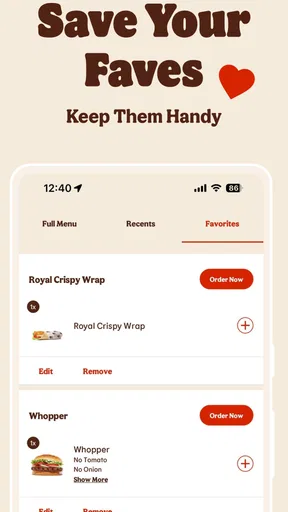
The app’s interface is clean and intuitive, making it easy for anyone to navigate. The bright colors and fun layout are inviting, and you won’t get lost trying to find what you need. Plus, it runs smoothly without any glitches, which is a huge plus in my book. The app even remembers your past orders, making reordering your favorites a snap.
That remembered-order convenience is most valuable when your preferences are stable. I’d still review a repeat order before sending it through: it is an easy way to catch a change in appetite, check any customizations, or avoid tapping through on autopilot. For someone who likes variety, browsing the menu may be more useful than repeating the same choice; for someone who has a dependable usual, a previous order can cut down decision time.
The app is available at no charge, and its Everyone age rating makes it broadly suitable for families to browse together. It has an average rating of 4.4 from around 308,000 ratings, with about 102,000 written reviews and more than 10 million installs. Those figures suggest it has reached a large audience, but I’d still judge it by whether its ordering and offers fit your own routine rather than treating popularity as a promise that every feature will suit you.
Its version 7.64.0 supports devices running Android 7.0 or later. If your phone is older or you use a different operating system, check compatibility in the relevant app store before planning around mobile ordering. This is a small but useful step when you are installing an app specifically for a meal on the way; finding out in advance avoids turning a quick stop into a troubleshooting session.
What the app does not replace
The app is focused on Burger King, so it cannot resolve every dining decision. If your priority is comparing several nearby chains, finding independent restaurants, or coordinating a group with different preferences, a broader restaurant or delivery service may be a better first stop. If you already know the chain and want its own menu and offers, this app is more direct. I see the two approaches as serving different moments, not as interchangeable tools.
There is also a trade-off in ordering digitally: you need to pay attention to the choices on screen and make sure the selected location and handoff suit your plans. At a counter, you can ask a person questions as you go; in an app, you need to inspect the menu and order summary yourself. I’d especially take an extra moment with customized items or a group order, where checking each selection is easier than trying to correct a mistaken choice after submitting.
And let’s not forget about the nutritional info. If you're counting calories or watching your diet, the app provides all the details you need to make informed choices.
When another approach is better
If you are comparing restaurants on price, cuisine or location, start with a service designed to show multiple choices rather than expecting a single-chain app to do that work. If you are already standing at Burger King and your order is simple, speaking to staff may be just as straightforward. If you want to browse BK’s menu in advance, tailor a familiar meal or check for a relevant promotion, the app has a clearer role. Choosing the right tool for the decision is more useful than assuming digital ordering is always faster.
For anyone trying to make a more considered food choice, the nutritional details are worth checking before settling on an item, rather than treating them as an afterthought once the order is complete. I’d use them alongside the menu and any customizations to compare the choices available to me. That does not turn a fast-food app into a nutrition coach; it simply makes the information easier to consult while deciding.
Final Thoughts
All in all, the BURGER KING® App is a must-have for any Burger King fan. It’s not just about ordering food; it’s about enhancing your entire fast-food experience. With its user-friendly design, great deals, and customization options, it makes grabbing a quick meal easier and more enjoyable. So go ahead, give it a try, and let your taste buds thank you later!
My recommendation is strongest for regular BK customers who value checking the menu before they arrive, want to personalize familiar items, or like having a chance to review offers before ordering. The app is less compelling if Burger King is only an occasional fallback, if you need a broad comparison across restaurants, or if you would rather make every choice at the counter. For those people, installing it may not change much about the experience.
For me, the deciding benefit is having another way to plan a Burger King stop, not a promise that every meal will be faster or cheaper. Use it when its menu, ordering path or current offers genuinely help with the decision in front of you; skip it when a general restaurant search or a direct counter order is simpler. That is the fairest way to get value from a chain-specific food app without letting the app make the meal choice for you.
Pros
- Easy-to-use interface with intuitive navigation.
- Exclusive deals and discounts available.
- Order customization options are extensive.
- Fast and reliable order tracking features.
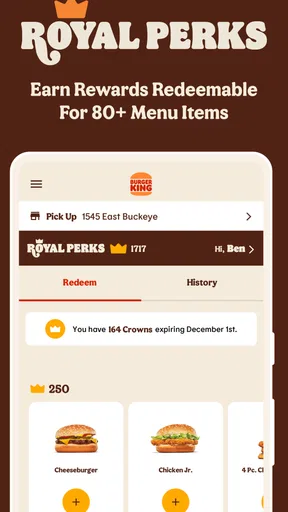
- Loyalty rewards for frequent users.
Cons
- Limited payment options can be inconvenient.
- App occasionally experiences slow loading.
- Not all menu items available for delivery.
- Location services can be inaccurate.
- Push notifications can be overwhelming.
FAQs for BURGER KING® App
What features does the BURGER KING® App offer?
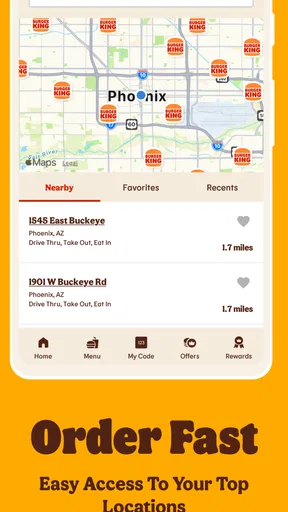
The BURGER KING® App provides a range of features to enhance your dining experience. Users can find exclusive deals and coupons, order food for pickup or delivery, customize their meals, and locate the nearest BURGER KING® restaurant. Additionally, the app allows for easy payment options and tracking of orders in real time.
Is the BURGER KING® App available for both Android and iOS devices?
Yes, the BURGER KING® App is available for both Android and iOS platforms. You can download it from the Google Play Store for Android devices and the Apple App Store for iOS devices. The app is designed to be user-friendly and compatible with most smartphones and tablets.
How do I redeem offers or coupons in the BURGER KING® App?
To redeem offers, simply navigate to the 'Offers' section in the app. Select the deal you wish to use and either apply it to your mobile order or show it at the restaurant counter. Ensure your app is updated to the latest version to access the most current deals and offers.
Can I customize my order using the BURGER KING® App?
Yes, the BURGER KING® App allows you to fully customize your order. You can choose your preferred ingredients, remove items you don’t want, and add special instructions as needed. This customization feature ensures your meal is prepared exactly to your liking before you complete the purchase.
Is my payment information secure on the BURGER KING® App?
The BURGER KING® App uses encryption and secure protocols to protect your payment information. You can safely store your preferred payment methods, such as credit/debit cards and digital wallets, for quick future checkouts. Always ensure that your app is updated to the latest version for optimal security measures.


